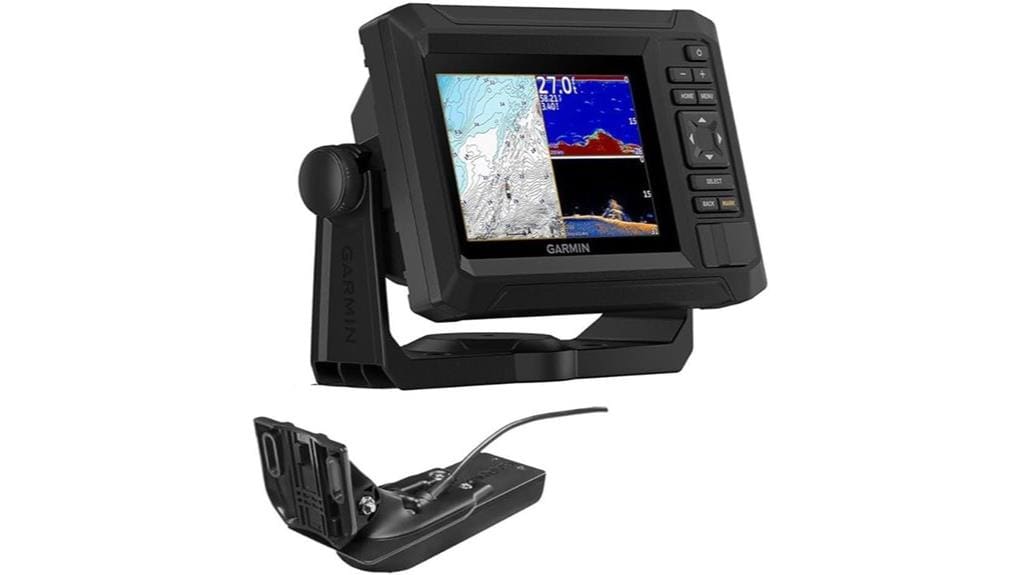
You’ll get a compact, map‑ready 5" unit with CHIRP plus ClearVü dual‑sonar and an included GT20‑TM transducer that delivers narrow‑beam fish arches and photographic side‑scan for structure ID. It supports LakeVü g3 and BlueChart/Navionics for high‑resolution bathymetry, Wi‑Fi syncing of waypoints, and efficient power use. Controls are keyed for tactile operation and calibration is straightforward. If you want specifics on mounting, settings, and comparable models, keep going for more.
Some Key Takeaways
- Compact 5" keyed ECHOMAP UHD2 54CV combines CHIRP and ClearVü dual‑sonar with the included GT20‑TM transducer for reliable fish and structure returns.
- Preloaded US coastal maps plus support for LakeVü g3 and BlueChart (Navionics) deliver high‑resolution bathymetry and useful tide/current overlays.
- Dual‑sonar layering reduces false positives and improves target separation, with refresh rates suitable for typical trolling speeds.
- Wi‑Fi syncing, route/waypoint sharing, and chart updates via Garmin Express simplify data management and keeping maps current.
- Best for anglers wanting compact dual‑sonar and mapping; compare against larger UHD2 screens or budget units for screen size and feature tradeoffs.
Garmin ECHOMAP UHD2 54CV: What’s Included and Key Specs
The ECHOMAP UHD2 54CV ships with a compact 5" keyed display unit, GT20-TM transducer, and preloaded US coastal maps; it also supports LakeVü g3 and BlueChart (with Navionics data) for advanced charting. You get a bright, high-contrast 5" keyed display optimized for visibility and precise input; it's not touch controls but offers reliable tactile operation. CHIRP and ClearVü dual-sonar capability, GT20-TM hardware, and market-leading mapping position it for versatile use. Wi‑Fi sharing simplifies data transfer between units. Expect efficient power management; measured battery life depends on installation and accessory load, but it's engineered for extended outings. It’s a solid choice for kayakers seeking reliable navigation and GPS speed trackers integration.
How CHIRP + ClearVü Dual‑Sonar Performs in Real Fishing Conditions
After covering what's in the box and the display and mapping features, take a close look at how CHIRP plus ClearVü actually performs on the water. You’ll see CHIRP’s narrow-beam returns for depth and fish arches paired with ClearVü’s photographic side scans, enabling effective sonar layering. In mixed-structure environments the dual-sonar reduces false positives and improves target separation, letting you discriminate fish from cover at sub-meter scales. Response latency is low; refresh rates keep pace with trolling speeds. Using the GT20-TM transducer, you’ll get consistent returns in coastal and inland waters, aiding confident, autonomous decision-making on the boat. For kayakers and beginners, choosing the right fish finder gear can make sonar data much easier to interpret.
Mapping, Charts, and Navigation: LakeVü G3, BlueChart, and Wi‑Fi Sharing
With LakeVü g3 and BlueChart (with Navionics data) preloaded, you get high-resolution bathymetry, contour detail, and up-to-date coastal cartography that let you plan routes and identify structure with precision. You’ll access LakeVü Enhancements like refined depth shading and substrate indicators that clarify target zones. Navionics Integration supplies crowd-sourced edits and tide/current overlays for coastal transit. Chart Updates are straightforward via Garmin Express or over‑the‑air; keep vector and raster layers current to reduce navigation risk. Wi‑Fi Syncing lets you push routes, waypoints, and user marks between compatible units quickly, preserving on-water freedom and situational awareness. For kayak navigation, don’t forget essential handheld GPS accessories like a floatpod or case to protect and stabilize your unit on the water.
Display, Controls, and Transducer (GT20‑TM): Usability and Setup Tips
Although compact, the 5-inch keyed display delivers bright, high-contrast imagery and tactile controls that let you operate the unit reliably in sunlight and rough conditions. You’ll learn the button layout quickly; primary keys access menus, zoom and sonar modes without menu diving. For best visibility, perform precise color calibration in calm water, using test patterns and adjusting gain, contrast, and palette to suit water clarity. Mount the GT20‑TM with transducer placement centered and angled per hull type to minimize turbulence. Plan cable routing along existing gunnels, secure with clamps, and avoid sharp bends to maintain signal integrity and serviceability. For extended outings consider carrying a compact backup battery to power your GPS and sonar when away from shore.
Verdict: Who Should Buy the 54CV, Price Comparison, and Alternatives
The sensible setup and clear controls described above make the 54CV straightforward to operate, so your buying decision should hinge on sonar needs, screen-size priorities, and budget. If you want dual-sonar CHIRP and ClearVü with included GT20-TM and compact 5" display, the 54CV suits you. Compare pricing versus larger-screen UHD2 models and larger screen options that sacrifice mapping depth or dual-sonar. Evaluate mounting options for portable versus flush installations. Choose the 54CV if you value market-leading LakeVü/BlueChart mapping, Wi‑Fi sharing, and a small footprint; pick alternatives only if you need bigger screens or lower entry cost. For new paddlers considering electronics, also review essential kayaker GPS gear to match unit features with installation and use on small boats.
Some Questions Answered
Is the Unit Compatible With Garmin Panoptix or Livescope Sonar?
No — you won’t get panoptix compatibility or livescope integration with this unit. The ECHOMAP UHD2 54CV supports CHIRP and ClearVü dual-sonar and uses the included GT20-TM transducer, but it lacks the interface and processing required for Garmin Panoptix or LiveScope. If you need forward-looking or real-time LiveScope-style imaging, you’ll want a compatible chartplotter model that offers chartplotter compatibility and is explicitly listed by Garmin as supporting panoptix compatibility and livescope integration.
Can I Add an External GPS Antenna for Improved Accuracy?
Yes — you can add an external antenna or GPS booster to improve GPS reception, provided you use a compatible Garmin marine GPS antenna and proper cabling. You'll mount the external antenna high, orient it for unobstructed sky view, and connect it to the chartplotter’s antenna/antenna-input or via NMEA 2000/0183 if supported. Doing this reduces positional drift and improves fix times, giving you more reliable navigation freedom on open water.
Does It Support NMEA 2000 Sensor Integration?
Yes — it supports NMEA 2000 sensor integration. You’ll connect the chartplotter to your vessel’s NMEA network for sensor networking of depth, speed, temperature, and heading data. It accepts standard NMEA 2000 PGNs and shares received parameters across compatible Garmin displays via Wi‑Fi. You’ll configure sources in the unit’s settings, prioritize sensors, and monitor real‑time diagnostics to guarantee reliable data fusion and consistent situational awareness while underway.
What Mounting Options and Power Cable Lengths Are Available?
You get both flush mount and portable kit options; you can install the unit recessed for a clean helm or use the portable kit for quick removal and shore transport. Power cable length from the unit to the plug is typically a 6-foot integrated lead, and installers often extend with marine-grade wiring to desired run lengths. You’ll use fused connections and strain reliefs to preserve freedom of placement and reliable power.
Is There a Warranty and How Do I Register the Device?
Yes — you get a limited warranty and you’ll register the device online. You’ll perform warranty registration and product activation at Garmin’s product activation portal, entering serial number, purchase date, and dealer info. You’ll keep proof of purchase for claims. Warranty terms vary by region; consult the included documentation or Garmin’s support site for coverage length and exclusions. You’ll receive confirmation email after successful registration and activation.