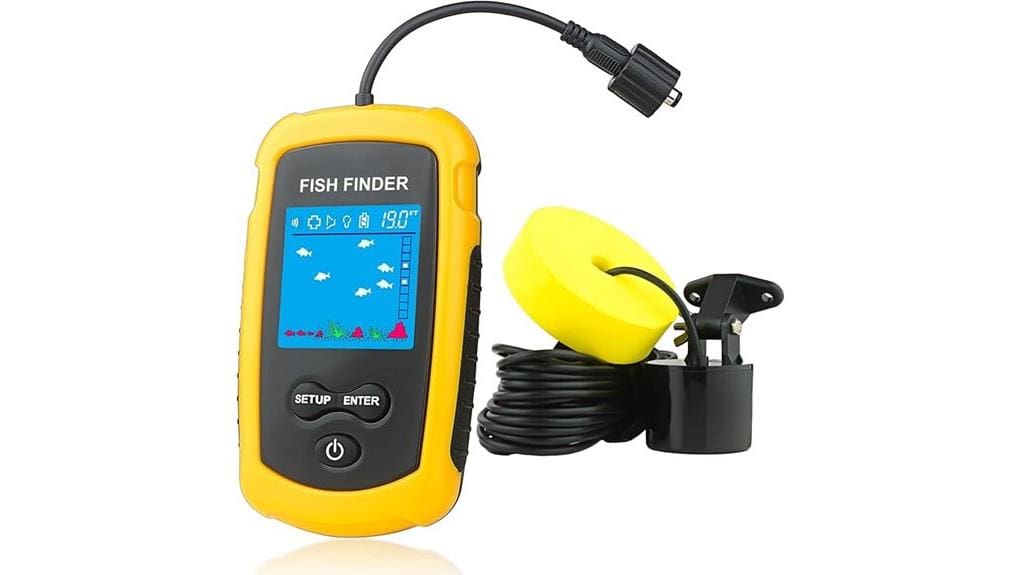
If you want a simple, portable fish finder that won’t weigh you down, the Venterior wired unit gives clear depth, basic fish-size icons and bottom-type readouts in a lightweight handheld package. It’s easy to set up on a kayak, dock or ice, runs about 4–5 hours on four AAA batteries, and handles typical weed and pilings with predictable results. It’s not scientific-grade, but it’s a solid budget choice—keep going for setup tips and best-use settings.
Some Key Takeaways
- Compact, no-frills wired fish finder ideal for kayaks, docks, and ice with a neck strap for hands-free use.
- Shows depth (1–100 m), fish-size categories, and bottom type within a 45° cone for quick location.
- Battery life about 4–5 hours on four AAA cells; battery-save mode extends runtime.
- Simple controls: sensitivity, backlight, fish alarm, and saved settings for easy field adjustments.
- Reliable real-world performance for structure and schools, but not scientific-grade in deep or cluttered water.
Quick Verdict and Key Specs for the Venterior Portable Wired Fish Finder
Quick verdict: the Venterior Portable Wired Fish Finder gives you a compact, no-frills way to locate fish and read bottom structure on a budget. You get clear depth, fish-size categories, and bottom type readouts in a lightweight handheld package. Portability options include a neck strap and small footprint that fits a tackle box, so you can move freely between spots. Battery life runs about 4–5 hours on four fresh AAA batteries; battery save mode stretches that. Sensitivity levels, backlight, and saved settings keep operation simple. It's practical, predictable, and built for anglers who value independence. Designed with kayakers in mind, it complements other portable gear for kayak adventures.
How the Fish Finder Performs in Real Use (Kayak, Dock, Ice)
Drop the sensor over the side and you’ll get a clear, no-nonsense read on depth, fish presence, and bottom composition whether you’re paddling a kayak, standing on a dock, or peering through a hole in the ice. You’ll appreciate the compact unit when kayak stability matters — the neck strap keeps the display handy without cluttering your cockpit. On docks check dock permissions before casting; the transducer works well near pilings but watch casting interference. For ice, the display is easy to read through cold layers; respect ice safety and keep batteries warm. Overall it’s reliable, portable, and freedom-friendly. Consider pairing it with a kayak camera mount to keep your hands free and your cockpit organized while fishing.
Setup, Controls and Best Settings for Reliable Readings
When you first power up the Venterior, set the transducer in calm water and walk through the on-screen prompts so the unit learns local depth and bottom conditions; this initial placement helps the sonar stabilize and gives more reliable readings. You’ll use a simple toss technique for kayak or dock work — cast gently, let the sensor sink, then steady the cable. Learn controls: power, backlight, fish alarm, and unit selection. Practice sensitivity dialing to balance noise and target returns; lower in shallow/weed, higher in deep/clear. Save settings, use battery-save when idle, and trust consistent placement for freedom on the water. For kayakers and beginners, choosing the right fish finder gear can make setup and use much easier.
What It Shows: Depth, Fish Targets, Bottom Type and Accuracy Limits
Although compact, the Venterior gives you clear, actionable readings: it shows total water depth, indicates approximate fish locations with size categories (small/median/big), and maps bottom composition (sand, rocks) plus vegetation (short/tall weeds) within a 45° cone beneath the transducer. You’ll see depth readouts from about 1 to 100 meters, fish icons that estimate size and depth, and simple bottom classification icons. Sensitivity and settings affect depth accuracy and target clarity; in deep or cluttered water targets blur. For kayak or dock use it’s precise enough to find structure and schools, but don’t expect scientific-grade detail. If you’re kayak fishing as a beginner, pairing it with a reliable portable battery can extend your time on the water.
Who Should Buy It and Alternatives at Similar Prices
If you want a simple, portable fish finder for kayak, dock or ice fishing that’s easy to toss in a tackle box and gives reliable depth, fish-location and basic bottom info, the Venterior is a solid, budget-friendly pick. You’ll like it if you’re a budget buyers or beginner anglers who value compact portability and straightforward readouts—depth, fish size hints, and bottom type—without complex setup. Urban anglers who fish from piers or small boats will appreciate the lightweight design and neck strap. Alternatives at similar prices include basic models from Garmin and Lucky—compare display clarity, depth range, and battery life before buying. It’s also a convenient complement to waterproof binoculars for kayakers who want to scan shorelines and spot fish-holding structure from a distance.
Some Questions Answered
Can the Unit Work Through Thick Ice or Only in Drilled Holes?
You’ll need drilled holes — the unit won’t transmit effectively through thick ice. For ice fishing on frozen lakes you’ll cut test holes or use an auger to get sensor contact with water; sonar needs clear water beneath the sensor to read depth, fish and bottom. If you want mobility and freedom, make test cuts at spots you choose, drop the sensor through the hole, and adjust sensitivity for best readings.
Is the Transducer Cable Replaceable if Damaged?
Yes — the transducer cable can be replaced if damaged, but it isn’t user-specified as a sold spare. You’ll want to check replacement options through brand support; they’ll tell you if they’ll send a replacement part or require service. If the damage’s covered under warranty coverage you can usually get help within the two-year period. Contact support promptly, describe the damage, and they’ll advise the fastest repair or replacement route.
Does Saltwater Require Rinsing After Use to Prevent Corrosion?
Yes — you should rinse saltwater off to avoid corrosion. For saltwater maintenance, wash the sensor, cable, and connections with fresh water after each use, dry thoroughly, and store dry. That simple step gives you reliable corrosion prevention and extends the unit’s life so you can keep fishing without worry. Periodically inspect connectors and use dielectric grease if you want extra protection in salty environments.
Can I Use Rechargeable AAA Batteries Instead of Alkalines?
Yes — you can use rechargeable AAA batteries, but check rechargeable compatibility first. You’ll get lower voltage (1.2V vs 1.5V), so some performance differences may occur; depth and fish detection usually work fine. Expect shorter battery runtime per charge compared with fresh alkalines, but you’ll save money and waste. Carry spare charged cells, and recharge after outings to keep the unit reliable and ready for freedom on the water.
Is the Neck Strap Removable or Replaceable?
Yes — the neck strap is removable, so you can detach it if you prefer not to wear it. You’ll find replacement options if you want a different style, length, or material; standard thin straps or paracord work well. You’ll enjoy the freedom to swap straps for comfort or security, and you can easily thread a new strap through the same attachment point without tools. Check dimensions for a snug fit.